Chord Finder: Look Up Any Chord and Hear It
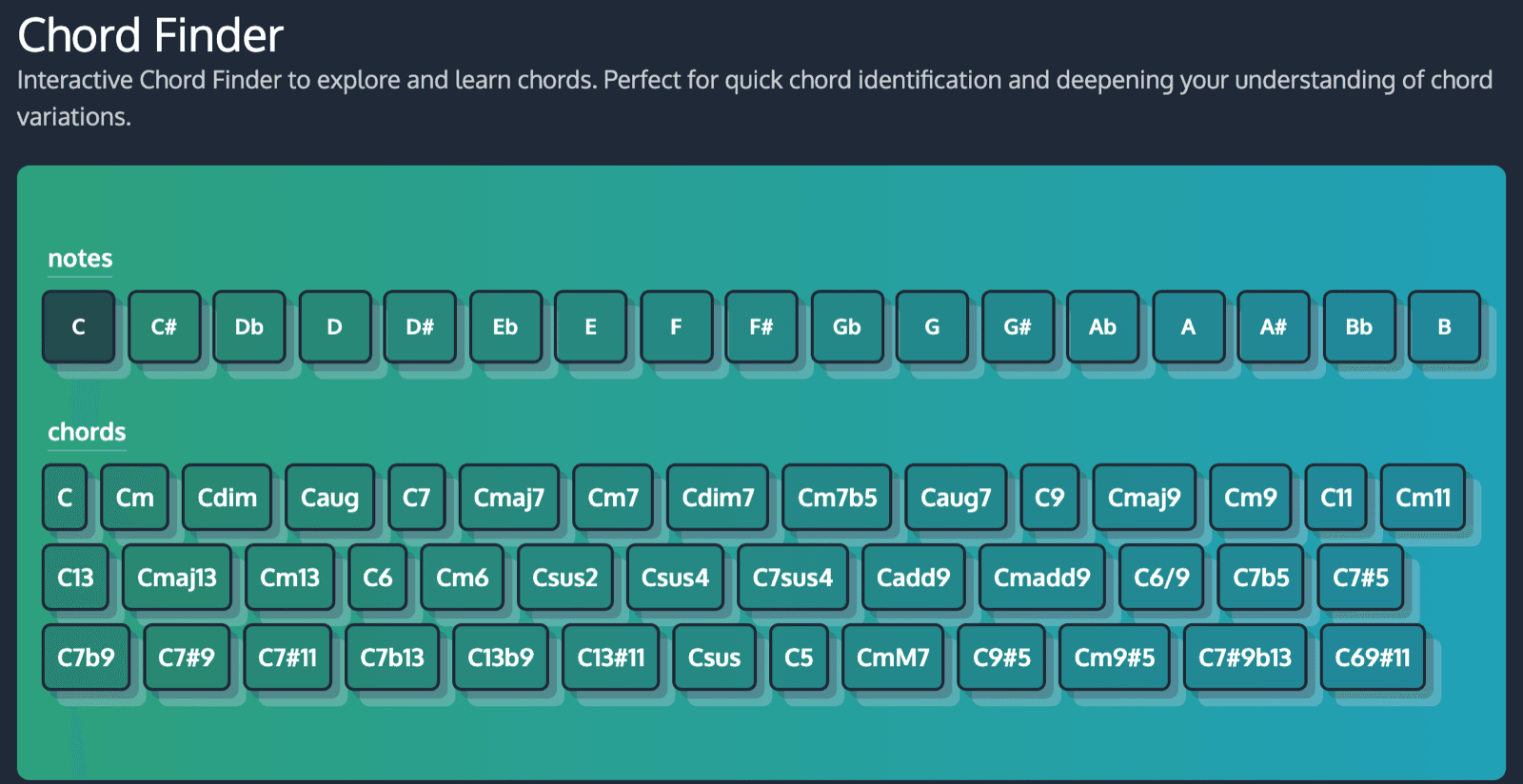
A chord finder lets you pick a root note, see every chord built on it, and hear what each one sounds like before you use it. ChordCreate’s free Chord Finder does exactly that: choose C and you get all 40-odd C chords, from plain C major to C7#9b13, each on its own page with the notes, an interactive piano and a play button.
The catch is that three completely different tools all go by the name “chord finder”, and search results mix them together. It is worth thirty seconds working out which one you actually need.
Three different things people mean by “chord finder”
Almost every frustration with these tools comes from reaching for the wrong one. Here is the honest breakdown.
| What you have | What you want | What you need |
|---|---|---|
| A chord name (“Am7”, “Cadd9”) | Its notes, and to hear it | A chord lookup, like ChordCreate’s Chord Finder |
| Notes or a shape under your fingers | The name of that chord | A reverse chord identifier |
| A recording of a song | The chords in it | An audio chord detector |
ChordCreate’s Chord Finder is the first kind. It works forwards: name in, notes and sound out. If you are holding a shape on the fretboard and want to know what it is called, or you want to pull the chords out of an MP3, you want one of the other two, and there are dedicated tools for both.
Most people searching for a chord finder want the first kind, because most of the time you have run into a chord name in a chart, a tutorial or a generated progression, and you want to know what it is and what it sounds like.
Looking up a chord by name
Open the Chord Finder and you get two rows. The top row is every root note: the twelve pitches, plus the five sharps written out again as their flat equivalents (C# and Db, D# and Eb, F# and Gb, G# and Ab, A# and Bb), so seventeen buttons in total. Click one and the bottom row fills with every chord that can be built on it.
That is the whole interface. Pick A, get Am, Am7, Amaj7, Adim7, Am7b5 and forty-odd others. Click any chord and you land on its own page.
Two things make this worth using over a static chord chart:
- It covers the awkward ones. Chord charts tend to stop at seventh chords. This goes out to C7#9b13 and C69#11, so when a jazz chart or a generated progression throws something unfamiliar at you, it is actually in there.
- Enharmonics are separate. Db and C# get their own lists. If you are working in a flat key, you can stay in flats instead of mentally transposing everything.
What a chord page tells you that a diagram does not
This is where a lookup earns its place over a printed chart. Take Am7:
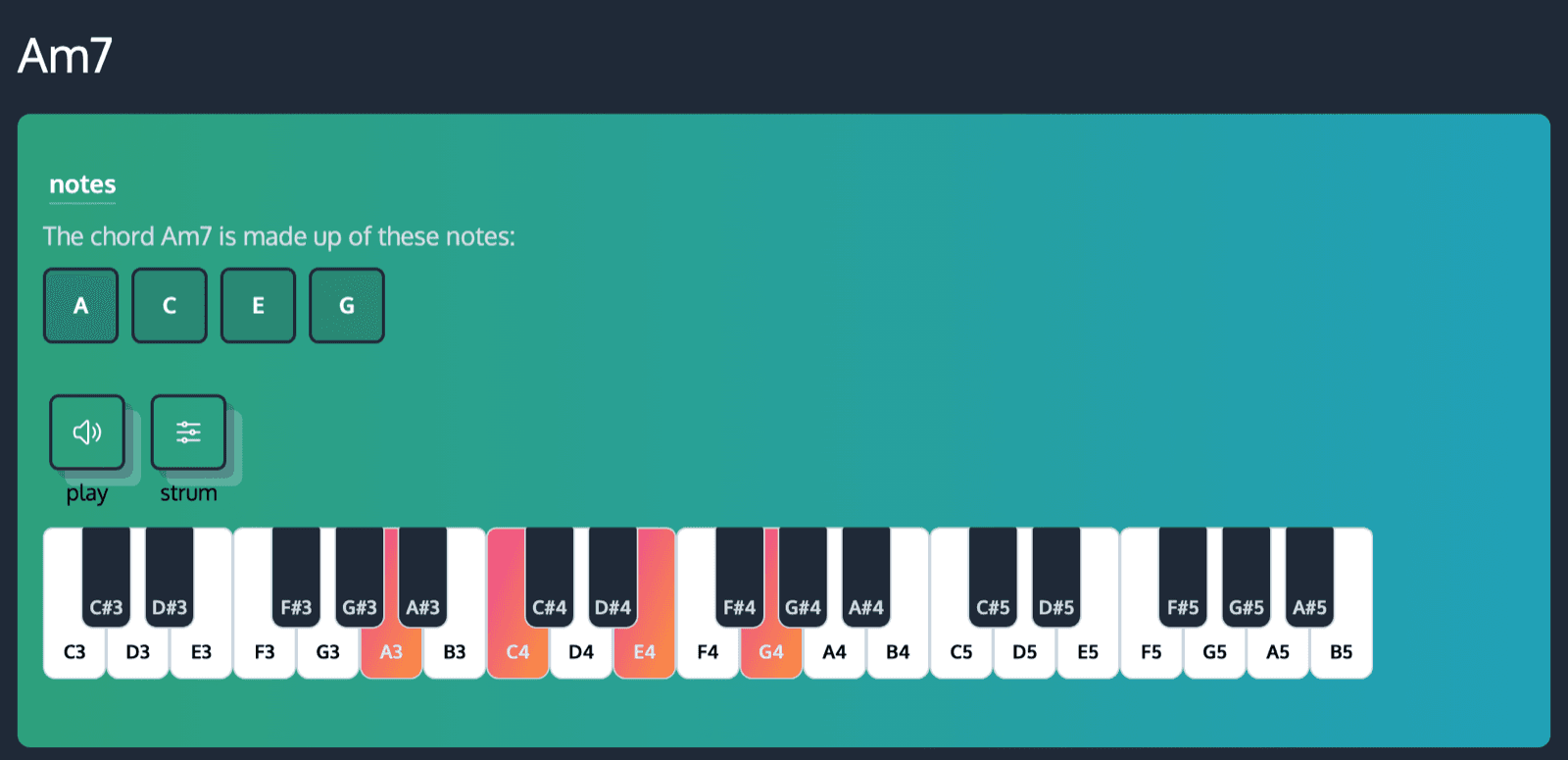
You get the four notes spelled out (A, C, E, G), those same notes highlighted on a piano keyboard, and a play button plus a strum button so you can hear it both as a block chord and rolled. Below that, every inversion is written out, and there is a list of every other chord sharing that root, so you can jump from Am7 to Am9 and hear the difference immediately.
Hearing it is the part that matters. You can read that a minor seventh chord is a minor triad with a flattened seventh on top and still have no idea why anyone would use one. Play Am7 once and the “warm, slightly unresolved” description stops being abstract. If you want the underlying theory first, what a chord actually is covers the ground in a few minutes.
Finding chords that sound good together
Looking up one chord is useful. Finding chords that work as a group is a different job, and it is usually the real question hiding behind “find me a chord”.
Say you have landed on Am7 and want to build around it. A minor ii-V-i, Bm7b5 to E7 to Am7, puts it in context:
Or keep it simple with Am7, Dm7, G7, Cmaj7 and let it sit in a loop that never quite resolves, which is most of lo-fi in one line:
That second one is a full turn around the circle in C major, and every chord in it has its own page: Dm7, G7, Cmaj7. Look up any of them if you want to see what is under the hood.
When you want a whole progression rather than a single chord, describing what you want in plain language is faster than hunting chord by chord. That is what ChordCreate’s generator is for, and there is a full walkthrough in how to generate a chord progression from a text prompt.
What an AI chord finder can and cannot do
Search for “AI chord finder” and a lot of what comes back is audio analysis: upload a song or point a microphone at it, and a model transcribes the chords. Chordify and Moises both work this way. That technology is real and genuinely useful for learning covers, and it is a different thing from what ChordCreate does.
Where AI helps on ChordCreate is the other direction. Instead of pulling chords out of an existing recording, you describe the music you want and it writes chords that fit:
| Task | Is AI involved? |
|---|---|
| Looking up the notes in Cadd9 | No. It is music theory, and the answer is fixed. |
| Transcribing chords from an audio file | Yes, but that is a different tool. ChordCreate does not do this. |
| Turning “dreamy lo-fi in A minor” into a progression | Yes. This is what ChordCreate’s generator does. |
Worth saying plainly: there is nothing intelligent about looking up the notes in Cadd9. It is C, E, G and D, it always has been, and a lookup table answers it perfectly. AI earns its keep on the creative side, where there is no single right answer.
When you can hear the chord but cannot name it
The hardest case is the one no lookup solves: you can hear a chord, maybe you can even play it, but you have no idea what it is called. A chord finder cannot help, because you have nothing to type in.
What does help is narrowing it down by ear. Is it major or minor? Does it feel settled or like it wants to move somewhere? Is there a note on top adding colour? Answer those three and you have usually cut the possibilities down to a handful you can check in the finder one at a time. Our guide to identifying chords by ear walks through the process properly.
A worked example: say the chord sounds major but slightly wistful, and it does not feel finished. Compare Cmaj7 and C6 in the finder. Both are four notes over a C major triad, and the only difference is the top one, a B in Cmaj7 and an A in C6. Play them back to back and the maj7 is the one that hangs. That is two lookups, not forty guesses, and next time you will recognise it without the tool.
Quick answers
What is a chord finder? A tool that takes a chord name and shows you its notes, usually with a diagram and audio so you can hear it. ChordCreate’s version covers every chord on all seventeen root notes.
Is there a free chord finder online? Yes. ChordCreate’s Chord Finder is free and needs no account. Pick a root note, pick a chord, and you get its notes, a piano view, inversions and playback.
Can a chord finder tell me the chords in a song? No. That needs an audio chord detector, which analyses a recording. A chord finder works from a chord name you already have.
How do I find a chord if I only know the notes? That is a reverse chord identifier rather than a chord finder. You can also narrow it down by ear and confirm your guess in the finder.
Do I need AI to find a chord? No. The notes in a named chord are fixed music theory, so a lookup answers it exactly. AI is useful for the creative side, like generating a progression from a description.